Plan and review
Plan hiring grants and pool capacity
Build a hiring forecast in Cap Table, size grants by shares or percentage, review plan shortfalls, and prepare actual option grants.
On this page
Add a planned role
Open Share classes, find Hiring plan, and choose Add role. Enter a role, whole-number headcount, and start month. Set a grant size per hire as a share count or percentage. Percentage sizing uses the current fully diluted share count, so its share equivalent can change as the cap table changes.
Choose the destination plan when several eligible plans are available. A row using the default plan follows the most recently adopted open plan that accepts options. Choose an explicit destination when the forecast depends on a particular reserve.
Review timing and shortfalls
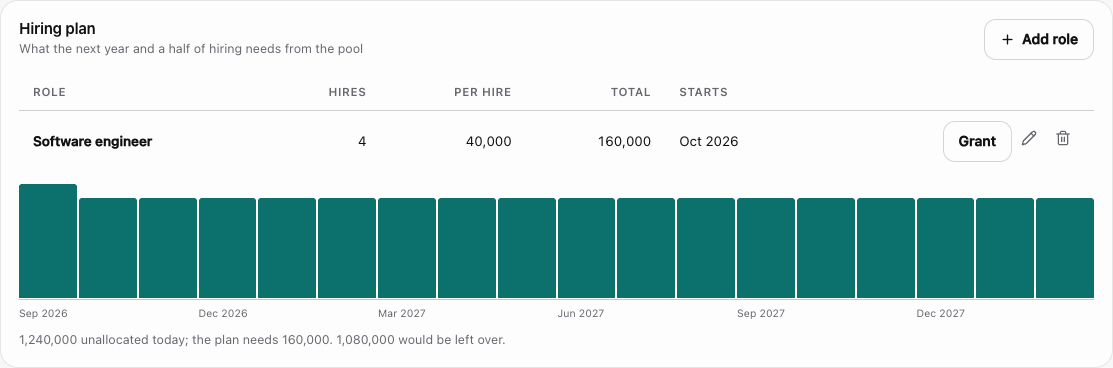
The forecast draws down the available pool by planned grant month and identifies a shortfall. Also inspect shortfalls by plan: aggregate capacity does not mean that the plan intended for an award has enough room.
An unscheduled role cannot establish the month a grant will occur. Review rows outside the forecast horizon as well as those plotted. The forecast describes proposed awards and does not reserve shares, issue securities, or change current ownership.
Use the forecast in round planning
When the forecast is short of shares, the card offers Cover the shortfall in the round model. It opens Round modeling, where Set the target to cover the plan solves the post-round pool target that covers the planned grants and fills the field with it. Enter the pre-money valuation and investment first: the button says what is missing rather than guessing, and it reports when the round cannot carry a top-up that large. Review the resulting dilution and destination plan afterwards. The target depends on the recorded hiring assumptions, and it does not establish that a reserve increase has been adopted.
Use the pencil action on a role to change its headcount, start month, grant sizing, or available plan choice. Use its delete action to remove a proposed role and review the resulting forecast. Changing or deleting a planned role does not alter an award already issued from it. Compare a base hiring case with a delayed or expanded case by editing the forecast deliberately and retaining the assumptions you reviewed. See Build an option-pool hiring forecast for a worked share-count example.
Move from planning to an actual award
The planned row’s grant action opens an option form prefilled with the per-hire share quantity and plan. Select the actual holder and confirm grant date, strike, vesting, classification, and approvals before saving.
The planned row remains after issuance. Reduce its headcount or remove it when the planned hires are complete. Otherwise, the issued award reduces actual availability while the unchanged row still forecasts a future grant.